Why You Need to Remove EXIF Data Before Publishing Images on Social Media
Table of Contents
As of May 2026, you should remove EXIF data before publishing images on social media because many platforms retain your GPS coordinates in their internal databases for tracking, even if they hide them from public view. Specific sharing methods like WhatsApp “Document” mode and third-party scheduling tools often skip the cleaning process entirely, leaving your precise location visible to recipients or hackers.
The Hidden Risks: Why You Need to Remove EXIF Before Publishing
The main reason to strip metadata is that EXIF (Exchangeable Image File Format) acts like a digital fingerprint. It often contains GPS Coordinates that can pinpoint exactly where you were within a few meters. While big names like Instagram and X (Twitter) claim to protect you by filtering images, this is usually just a surface-level fix that does not apply to the data the companies keep for themselves.
Understanding the “Internal Retention” Trap
A major risk in 2026 is that “stripping” data for the public does not mean the data is actually deleted. According to Fastio, the moment you upload a photo, the platform grabs the original, full file. Internal Retention policies at companies like Meta and X allow them to store your original GPS data for ad targeting and behavioral tracking, even if your followers never see those details.
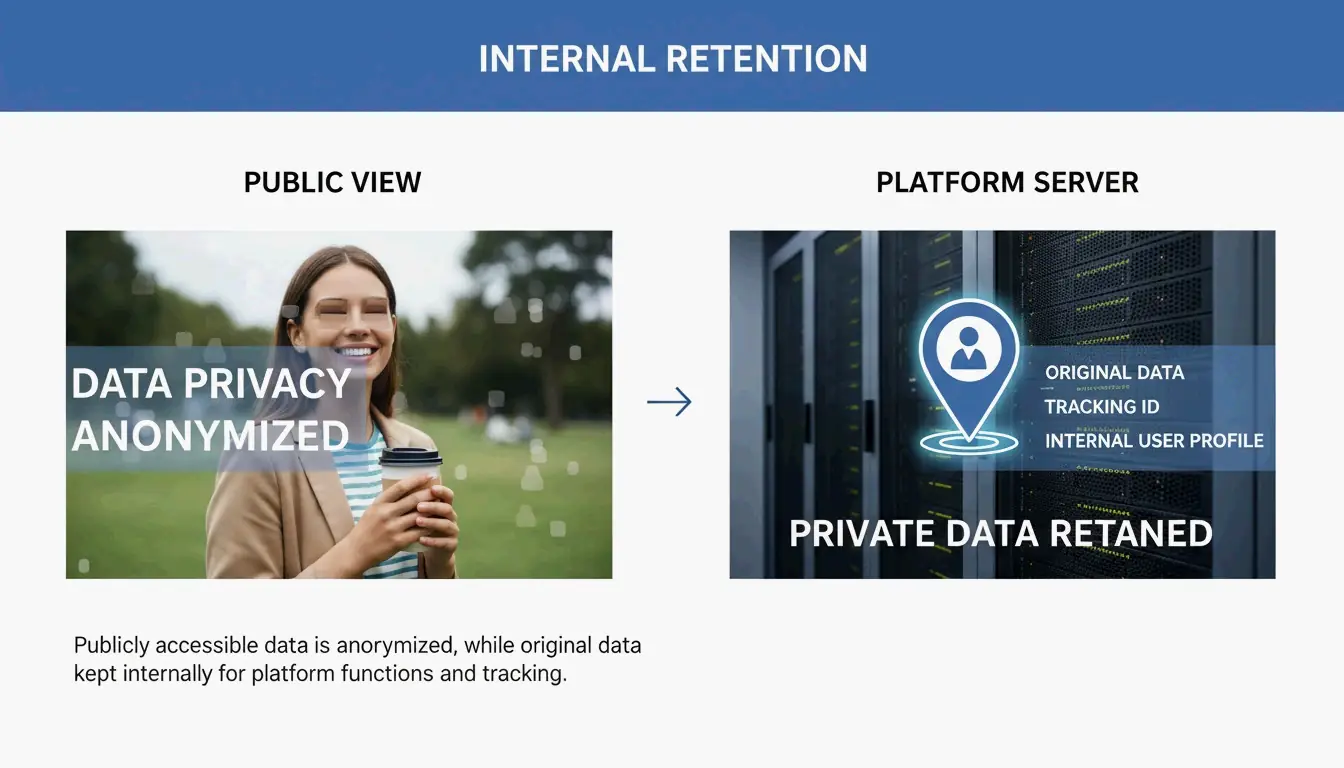
Relying on a platform to clean your files is a reactive move that can fail. Take the Reddit HEIC Metadata Leak (Vulnerability #1069039) mentioned by SammaPix. In that case, photos in the HEIC format were converted to PNG during upload but accidentally kept their GPS tags. This exposed users’ home locations until a patch was finally released. If you remove the data on your own device first, the platform never gets that sensitive information to begin with.
When Social Media Fails: Why Automatic Stripping Is Not Guaranteed
You cannot just assume an upload button is a privacy filter. In 2026, whether your metadata stays or goes depends on how you share the file. Testing by MetaClean shows that while public feeds are mostly safe, private channels are much riskier.
| Sharing Method | Platform | EXIF Stripped? | Risk Level |
|---|---|---|---|
| Public feed post | Instagram / Facebook | Yes | Low |
| Standard photo share | Yes | Low | |
| Document mode | No | High — 100% metadata preserved | |
| “Best quality” DM | Instagram / X | Unreliable (23% GPS leak rate) | Medium-High |
| API upload (Buffer, Hootsuite) | X (Twitter) | Unreliable (30% device info retained) | Medium-High |
- WhatsApp Document Mode: This is a major privacy trap. According to SammaPix, when you send a photo as a “Document” to keep the quality high, the app preserves 100% of the metadata, including your exact GPS location.
- Direct Messages (DMs): On Instagram and X (Twitter), DM systems are not always as strict as the public feed. Tests show that sending photos in “best quality” or original format via DM can leak GPS data in about 23% of cases.
The Social Media Manager’s Blindspot: API Posting Risks
If you manage social media professionally, automation is your biggest danger zone. API Uploads — the tech used by tools like Buffer, Hootsuite, and Sprinklr — often bypass the standard cleaning steps built into official mobile apps. MetaClean’s 2026 testing found that images posted via the X API kept device model info in roughly 30% of cases, and GPS stripping was much less reliable than manual uploads. If you schedule content, you need to clean your files before they hit your queue.
How to Remove EXIF Data: Step-by-Step Guide for Every Device
To stay private, handle the metadata removal locally before the file ever leaves your phone or computer. As a bonus, ImgTweak notes that stripping metadata can shrink your file size by 10-20% without hurting image quality.
| Device | Method | Steps |
|---|---|---|
| Windows | Properties panel | Right-click > Properties > Details > “Remove Properties and Personal Information” |
| Mac | Preview app | Open in Preview > Tools > Show Inspector > GPS tab > “Remove Location Info” |
| iOS | Share Sheet | Tap Share > Options > toggle off “Location” |
| Android | Gallery share | Look for “Remove location data” toggle in share settings |
| Pro/Power User | ExifTool CLI | Run exiftool -all= image.jpg to wipe every hidden header |
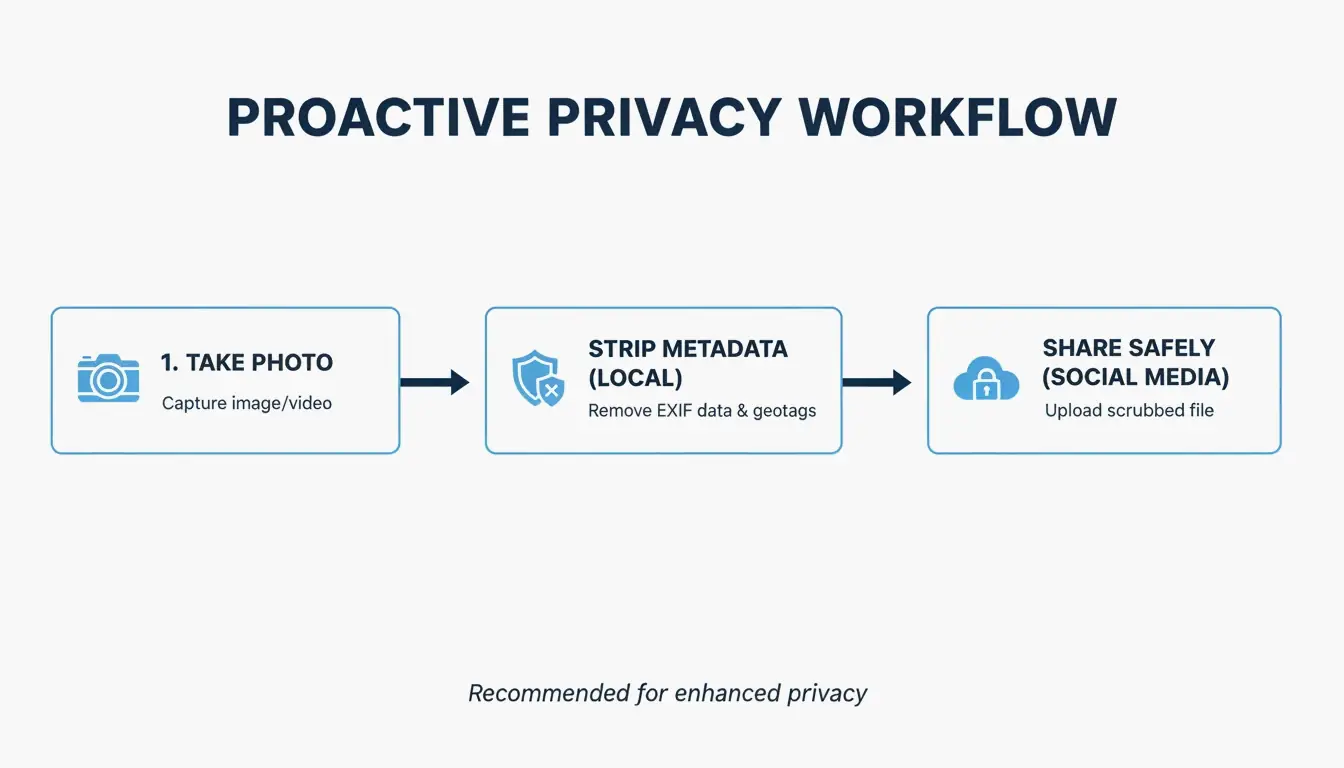
Pro-Level Auditing: For power users, ExifTool is still the best option. The command exiftool -all= image.jpg completely wipes every hidden header in the file — EXIF, XMP, IPTC, and MakerNotes.
Screenshotting vs. Stripping: Privacy vs. Image Quality
Many people take a screenshot of a photo to “strip” the data. Since a screenshot is a brand-new file, it will not have the old EXIF info. This works for privacy, but it kills your resolution. A high-quality 48MP photo can drop to just 2-4MP. It is better to use a dedicated stripping tool so you can keep your high-res pixels while ditching the hidden tracking data.
| Method | EXIF Removed? | Resolution Preserved? | Speed |
|---|---|---|---|
| Screenshot | Yes | No (drops to 2-4MP) | Instant |
| ExifTool | Yes | Yes | Fast (CLI) |
| OS built-in tools | Yes (partial) | Yes | Quick |
| Dedicated app (e.g., ImageOptim) | Yes (complete) | Yes | Moderate |
Privacy Leaders: Comparing Platform Metadata Policies in 2026
The 2026 privacy landscape shows a big gap between “privacy-first” apps and data-hungry networks. According to the MetaClean 2026 Platform Comparison, Signal is the gold standard. It is the only major app that wipes all EXIF data before sending and stores nothing on its servers.
| Platform | Public Feed | DMs/Messaging | Internal Retention | Overall Rating |
|---|---|---|---|---|
| Signal | N/A | Full strip | None stored | Best |
| Instagram / Facebook | Stripped for public | Partial | Retained for ad targeting | Moderate |
| N/A | Stripped (photo mode) | Retained by Meta | Moderate | |
| X (Twitter) | Stripped | Unreliable | Retained | Moderate |
| iMessage | N/A | Not stripped | Stored on device/iCloud | Poor |
| Email (Gmail/Outlook) | N/A | Not stripped | Stored on servers | Poor |
On the other hand, Instagram and Facebook use a “Strip for the Public, Keep for the AI” approach. They hide your location from other users but use it themselves to build a profile on you. Meanwhile, iMessage and standard Email (Gmail/Outlook) offer almost no protection — they send the original file with all GPS data intact to whoever receives it.
Conclusion
Social media platforms might promise privacy, but EXIF data is still a massive loophole in 2026. Automatic cleaning is inconsistent, particularly when using professional scheduling tools, sending files as “documents,” or using high-quality DM settings. Most platforms also continue to harvest your location for their own use even after hiding it from the public. To truly protect your physical safety, use a metadata scrubber or a privacy-focused app like Signal before you share. Do not assume the platform is looking out for you; take control of your data before you hit upload.
FAQ
Does taking a screenshot remove EXIF data?
Yes, taking a screenshot creates an entirely new image file that does not carry the original photo’s metadata. However, there is a significant trade-off: you will lose substantial image resolution and quality compared to using professional stripping tools that remove data while preserving the original pixels.
Does WhatsApp remove GPS location when sending photos?
It depends entirely on the sending mode. In 2026, standard “Photo mode” strips most data, but “Document mode” leaks 100% of EXIF data, including GPS. Additionally, “Best quality” mode is unreliable, with testing showing that GPS coordinates survive in roughly 23% of cases.
Can law enforcement use EXIF data even if I delete the post?
Yes. Most social media platforms retain the original uploaded file — including all its metadata — on their internal servers even after a post is deleted from public view. This retained data can be accessed by law enforcement through legal subpoenas or court orders directed at the platform.
About the Author
Indie Hacker & DeveloperI'm an indie hacker building iOS and web applications, with a focus on creating practical SaaS products. I specialize in AI SEO, constantly exploring how intelligent technologies can drive sustainable growth and efficiency.
Last reviewed May 16, 2026. This article is reviewed for accuracy and updated when tooling or platform behavior changes.