Understanding Aspect Ratio: The Complete 2026 Guide for Social Media, Video, and Displays
Table of Contents
Aspect ratio is the proportional relationship between an image’s width and height, expressed as a ratio like 16:9. In 2026, 16:9 remains the standard for TV and YouTube, 9:16 is essential for vertical social media, and 21:9 has become the industry benchmark for immersive gaming and professional multi-window workstations. Understanding which ratio to use — and why — is fundamental to producing content that displays correctly across every platform.
What Is Aspect Ratio? Definition and Core Principles
Aspect ratio describes the shape of a frame, not its size or pixel count. The Aspect Ratio Calculator expresses this as two numbers separated by a colon (width:height): for every X units of width, there are Y units of height. This proportion remains constant whether viewing on a smartphone or a cinema screen.
A common point of confusion: aspect ratio and resolution are different measurements.
- Aspect ratio describes the frame shape (square, landscape, portrait).
- Resolution (e.g., 1920 x 1080) describes total pixel count and image sharpness.
Multiple resolutions can share the same aspect ratio. Both 1080p Full HD and 4K UHD are 16:9 (Widescreen), even though 4K has four times the pixel density.
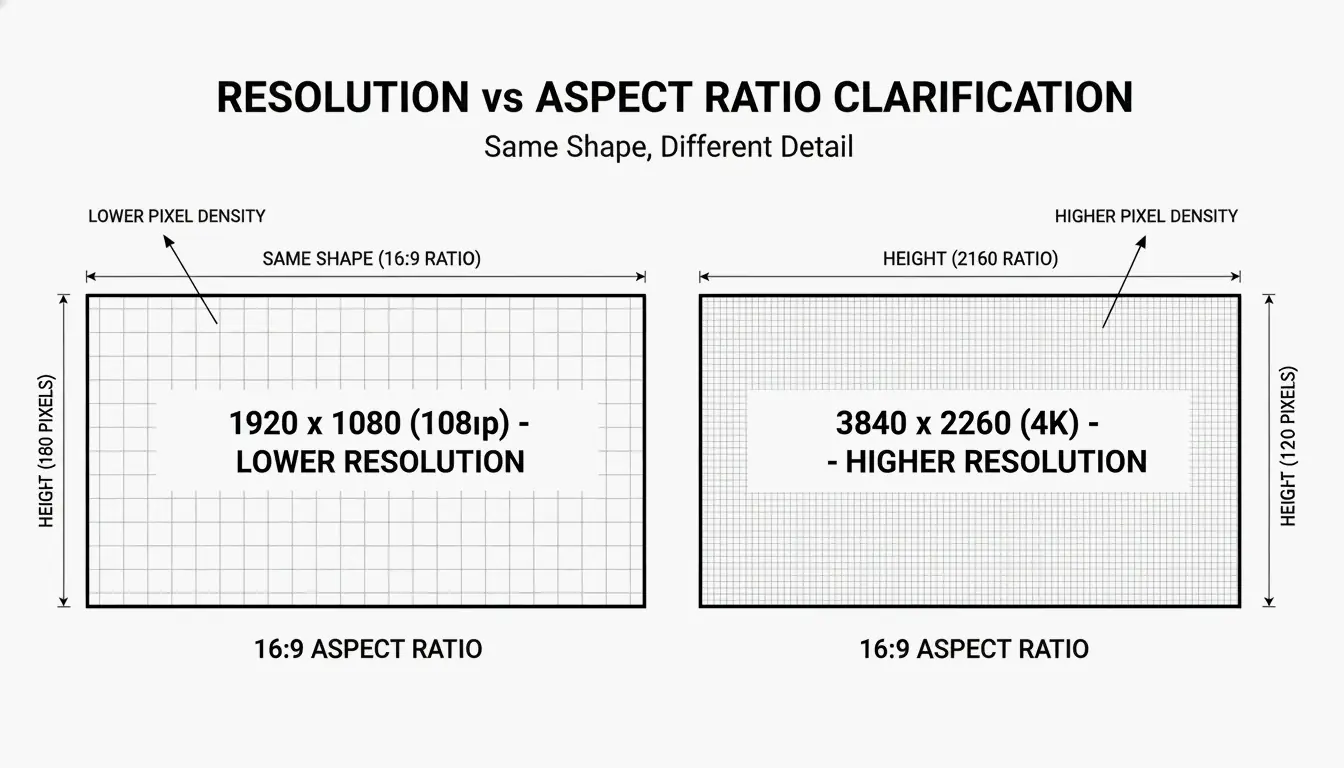
The 16:9 ratio became the universal widescreen standard as a mathematical compromise between older 4:3 TVs and wider 2.35:1 cinema screens. According to the Steam Hardware Survey, 16:9 remains the most popular display orientation in 2026, with 1080p resolution alone accounting for 67% of the gaming market.
The Math: How to Calculate Aspect Ratio from Pixels
To derive the aspect ratio from pixel dimensions, find the Greatest Common Divisor (GCD) of the width and height. The Aspect Ratio Calculator demonstrates:
- 1920 x 1080: GCD is 120. Divide: 1920/120 = 16, 1080/120 = 9. Result: 16:9.
- 4000 x 3000: GCD is 1000. Divide: 4000/1000 = 4, 3000/1000 = 3. Result: 4:3.
2026 Platform Standards: Social Media and Video Requirements
The shift toward 9:16 (Vertical) video continues to accelerate. This format, popularized by TikTok, Instagram Stories, and YouTube Shorts, fills a smartphone screen held upright. Buffer recommends using a resolution of 1080 x 1920 pixels to avoid unwanted borders or cropping.
Instagram Post Sizes (2026 Update)
| Format | Dimensions | Ratio | Best Use |
|---|---|---|---|
| Square | 1080 x 1080 px | 1:1 | Classic grid posts |
| Portrait | 1080 x 1350 px | 4:5 | Maximum screen space |
| Landscape | 1080 x 566 px | 1.91:1 | Wide compositions |
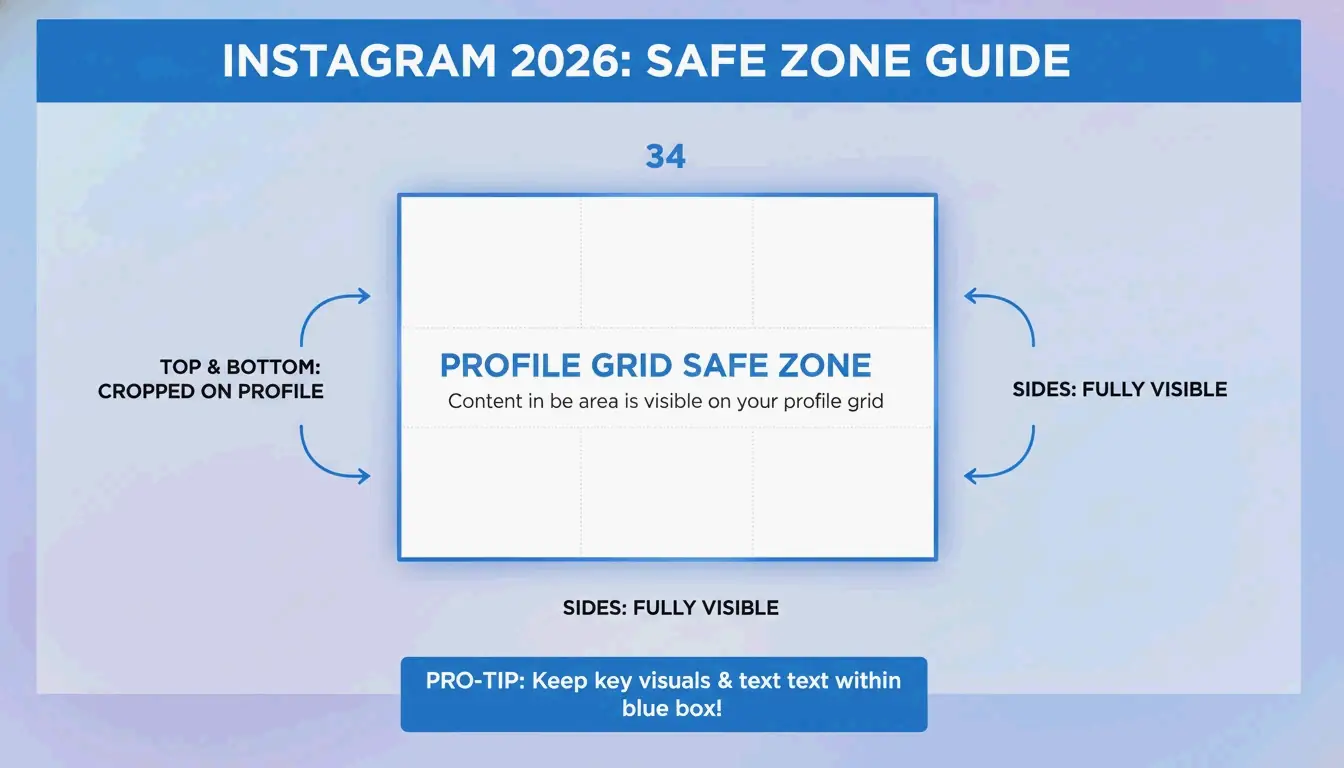
A significant change in the 2026 Instagram update: the profile grid now uses 3:4 previews. Data from Buffer shows that creators must center important elements within this 3:4 “safe zone” to prevent cropping on profile pages.
The Unified Creator Standard: Mapping Ratios Across Platforms
To maximize reach, creators typically adapt one video into multiple ratios. The standard workflow: shoot in high-resolution 16:9 or 9:16, maintaining “safe zones” for app buttons and text overlays. On TikTok and Reels, the app places profile names and buttons over the video. Buffer recommends leaving approximately 250 pixels of empty space at the top and bottom of a 9:16 frame to keep text and logos readable.
Beyond the Screen: 21:9 Ultrawide and 3:2 Photography
While 16:9 is the most common format, several specialized ratios serve distinct professional needs.
| Ratio | Primary Use | Key Advantage |
|---|---|---|
| 21:9 (Ultrawide) | Gaming, professional editing | 33% more horizontal space than 16:9 |
| 3:2 | Photography (DSLR/mirrorless) | Extra height vs. 16:9 for document editing |
| 2.00:1 (Univisium) | Streaming originals (Netflix, Amazon) | Cinematic feel that fills modern TVs efficiently |
A Dexon Systems Analyst points out that 21:9 fits the human field of view more naturally than standard widescreen. For streaming, Univisium (2.00:1) — championed by cinematographer Vittorio Storaro — has become a required format for many streaming originals, per Wikipedia.
Technical Deep Dive: DAR, SAR, and PAR Explained
Three technical ratios govern how digital video displays correctly:
| Ratio | Full Name | Definition |
|---|---|---|
| DAR | Display Aspect Ratio | The actual shape of the screen (e.g., 16:9) |
| SAR | Storage Aspect Ratio | Ratio of pixel width to pixel height |
| PAR | Pixel Aspect Ratio | Shape of a single pixel (1:1 for modern screens) |
The relationship: SAR x PAR = DAR. As Wikipedia explains, mixing up these values when saving a video produces a “stretched” or distorted image. Most modern screens use square pixels (1:1 PAR), but older broadcast formats like NTSC used rectangular pixels.
Letterboxing and Pillarboxing: Fixing the Black Bars
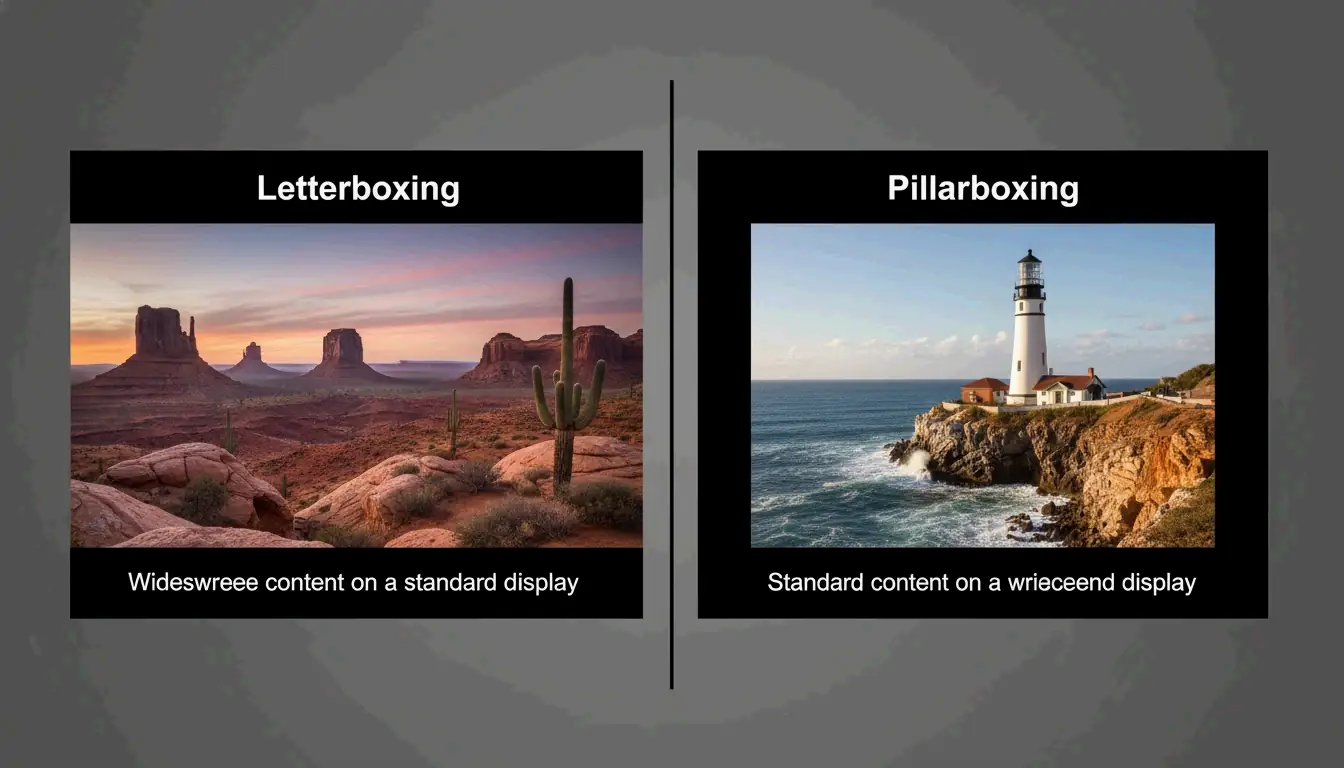
When a video’s shape does not match the display, the system adds black bars to maintain correct proportions.
- Letterboxing: Bars at top and bottom (wide content on a narrower screen).
- Pillarboxing: Bars on left and right (narrow content on a wider screen).
Professional Implementation: Custom LED Walls and High-End Displays
By 2026, custom LED walls present new challenges. These installations often have non-standard shapes that do not match conventional monitors. A Dexon Systems case study explains that professional video controllers are now required to scale 16:9 or 21:9 footage to fit custom shapes without stretching or losing important details.
In command centers and high-stakes environments, Super Ultrawide (32:9) displays have become standard. These are effectively two 16:9 monitors joined seamlessly, allowing operators to track multiple data feeds — maps, cameras, dashboards — in a single uninterrupted view.
Conclusion
Aspect ratio is the invisible framework of digital content. It determines how audiences experience everything from a five-second ad to a three-hour film. Selecting the correct ratio — 9:16 for social media, 16:9 for standard video, or 21:9 for productivity — is essential for professional results in 2026.
Actionable steps: Audit your content workflow to ensure 3:4 “safe zone” compliance for social media. For improved productivity, consider migrating to a 21:9 or 32:9 display to reduce multi-monitor clutter.
FAQ
What is the best aspect ratio for a custom-shaped LED wall in 2026?
The optimal ratio depends on the physical dimensions of the wall, but most professional hardware is designed to scale from a standard 16:9 or 21:9 source. As Dexon Systems advises, ensure your video controller supports non-standard scaling to preserve the intended proportions and avoid visual distortion.
How do I fix “black bars” (letterboxing) on my video?
Match your export settings to the intended display’s aspect ratio. If the source and display ratios differ, use “Crop to Fill” or “Center Crop” methods. These remove the bars by expanding the image to fill the screen, though some image area at the edges will be lost.
What is the difference between 16:9 and 21:9 for professional monitoring?
16:9 is the standard format for single-task focus and general media consumption. 21:9 provides 33% more horizontal screen real estate. According to Dexon Systems, 21:9 is ideal for professional monitoring because it matches the human field of view and enables side-by-side windows without monitor bezel interruption.
About the Author
Indie Hacker & DeveloperI'm an indie hacker building iOS and web applications, with a focus on creating practical SaaS products. I specialize in AI SEO, constantly exploring how intelligent technologies can drive sustainable growth and efficiency.
Last reviewed May 16, 2026. This article is reviewed for accuracy and updated when tooling or platform behavior changes.