How to Remove Gemini Nano Banana Watermark from Images: 3 Fast & Free AI Methods
You can remove the Gemini Nano Banana watermark from im […]
You can remove the Gemini Nano Banana watermark from images for free using online AI tools like GeminiWatermarkTool, which features “Quick Crop” and “AI Smart Removal” directly in your browser. For local processing, professional software like HitPaw Edimakor uses automated AI detection to wipe out logos while keeping background textures and image resolution intact.
How to Remove Gemini Nano Banana Watermarks Online for Free?
The fastest way to clean up your AI-generated art is to use tools built specifically for Google’s placement of AI stamps. GeminiWatermarkTool has become a go-to because it handles the removal inside your browser—this means your files never actually hit a third-party server.
This tool is tuned for the Gemini Nano Banana logo, which usually sits in the bottom-right corner. By using Browser-based Local Processing, you skip the privacy risks that come with uploading personal photos to cloud editors.
Method 1: GeminiWatermarkTool for Privacy-Conscious Users
If you care about data security, the “Zero-Server” setup is a big deal. GeminiWatermarkTool is a big deal. Your creative work isn’t stored in some random external database.
Step-by-Step Guide for Online Removal:
- Upload the Image: Drag your file into the window. Keep it under 10 MB so your browser’s RAM can handle the processing smoothly.
- Select “Quick Crop”: Use this if the watermark is on a solid-colored edge. It trims the pixels instantly without touching the main subject.
- Select “AI Smart Removal”: If the logo overlaps something complex like grass or fabric, this tool fills in the gaps by reconstructing the pixels.
- Download: Save the final result as a PNG or JPEG.
Professional Batch Removal with HitPaw Edimakor
Manual editing gets old fast if you have a lot of images. HitPaw Edimakor is a better choice for large projects, letting you process dozens of files at once. It uses deep learning to tell the difference between the “Banana” logo and your actual art, which helps it maintain high-fidelity textures that basic blur tools just ruin.
This is especially helpful for images from the 2.5 Flash Image Preview model, where watermarks can be semi-transparent or have different “Alpha” levels.
Step-by-Step: Batch Processing 50+ Images at Once
As Yuraq Wambli, an expert at HitPaw, points out: “Removing watermarks from AI-generated photos for personal use is generally permitted, as long as it doesn’t violate the platform’s specific terms of service regarding commercial distribution.”
To process in bulk:
- Open the Toolbox: In HitPaw Edimakor, go to the “Image Watermark Remover” section.
- Import Bulk Files: Select up to 50+ images from your computer.
- Apply AI Detection: The software finds the exact coordinates of the Gemini Nano Banana watermark across every file automatically.
- Export: Hit “Remove and Export” and you’re done in seconds.

Advanced Prompting: How to Prevent or Minimize Watermarks in Gemini?
Actually, the smartest way to remove the Gemini Nano Banana watermark from images is to stop it from appearing in a bad spot to begin with. You can use prompt engineering to influence where Google AI places its metadata and stamps.
The visibility often changes depending on which model you use. In 2026, users have noticed that the 2.5 Flash Image Preview or “Flash” models tend to have more obvious watermarks than “Pro” or “Ultra” versions, which often use invisible digital watermarking (like SynthID).
Prompting Tips to Minimize Watermark Impact:
- Aspect Ratio Padding: Ask for a wider aspect ratio (like 16:9 for a 4:3 shot). The watermark lands in a “dead zone” that you can crop later without ruining the composition.
- Compositional Shifting: Use phrases like “subject centered with significant negative space at the bottom.” This keeps the logo away from the important details.
- Model Selection: When you can, use Gemini Pro models. They usually deliver cleaner outputs than the Nano mobile previews.

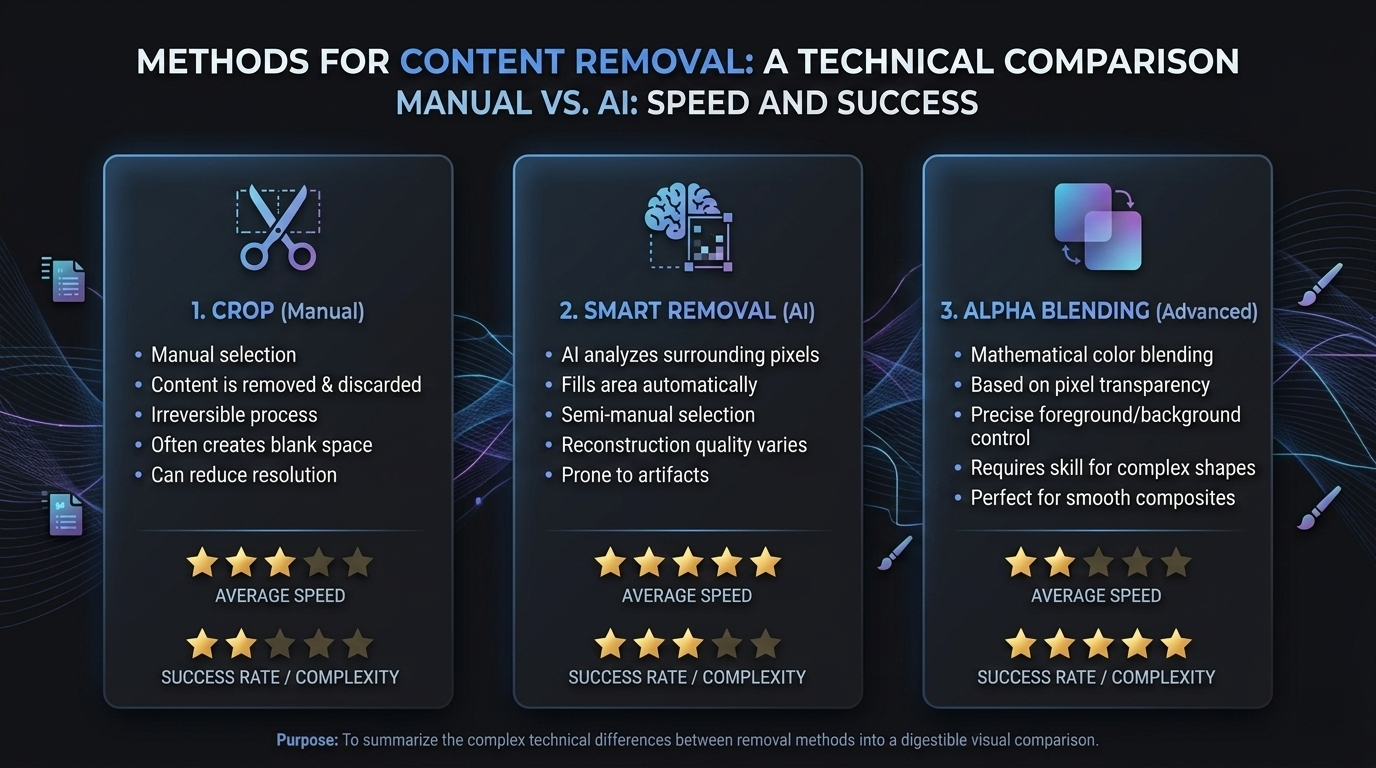
AI Smart Removal vs. Reverse Alpha Blending: Which is Better?
There is some debate over which tech works best. AI Smart Removal acts like “Generative In-painting”—it looks at what’s nearby and guesses what should be behind the logo. Reverse Alpha Blending is more mathematical; it tries to “un-layer” the logo by calculating its transparency and restoring the original pixels underneath.
| Feature | Quick Crop | AI Smart Removal | Reverse Alpha Blending |
|---|---|---|---|
| Best For | Simple edges | Complex textures (Hair, Water) | Faded/Translucent logos |
| Speed | Instant | 5-10 Seconds | High (Manual) |
| Integrity | Loses edge pixels | Keeps the full canvas | Keeps the full canvas |
| Success Rate | 100% | 95% (Varies) | 80% (Requires math) |
Best Methods for Portraits vs. Landscapes
For Portraits, where skin texture is everything, AI Smart Removal is the best choice. It can recreate pores and shadows hidden by the Nano Banana logo. For Landscapes, like a clear sky, a Quick Crop or a simple blur-and-fill is usually all you need.
FAQ
Is it legal to remove watermarks from Gemini AI-generated images?
Removing watermarks from copyrighted professional photography may be illegal under the DMCA. However, altering AI-generated watermarks for personal creative use or “polishing” your own prompts is generally permitted. As Yuraq Wambli mentions, always check the current intellectual property regulations if you intend to use the images for commercial advertising.
Which image formats are supported by Nano Banana removers?
Most online tools like GeminiWatermarkTool support standard formats including JPEG, PNG, and WebP. For more complex files or high-resolution TIFF/RAW formats, desktop software like HitPaw Edimakor is recommended to avoid compression artifacts.
Can I remove Gemini watermarks on mobile browsers without an app?
Yes, browser-based tools are mobile-responsive. Because they use Browser-based Local Processing, you can open your mobile Chrome or Safari browser, upload the image, and perform the removal directly on your phone without downloading an extra app from the Play Store or App Store.
Conclusion
Getting the hang of how to remove the Gemini Nano Banana watermark from images lets you use your AI art exactly how you want. You can go the privacy-first route with GeminiWatermarkTool or handle high-volume work with HitPaw Edimakor. Just pick the tool that fits your current project’s needs.
Action Plan:
- For a one-off edit, head to GeminiWatermarkTool
- For professional batch processing with hundreds of images to clean, download a dedicated suite for faster, high-res results.
Written by
SectoJoy
Indie Hacker & DeveloperI'm an indie hacker building iOS and web applications, with a focus on creating practical SaaS products. I specialize in AI SEO, constantly exploring how intelligent technologies can drive sustainable growth and efficiency.


