How to Compress Photos in 2026: Reduce File Size Without Losing Quality
目錄
To compress photos in 2026, use online tools like TinyJPG or professional software like Adobe Photoshop. You can reduce file sizes by up to 90% by adopting modern formats like WebP or AVIF, setting quality sliders to the 75-85% range, and resizing dimensions to a standard 1000px width for web use.
The 2026 Standard: How to Compress Photos Efficiently
Photo compression in 2026 has moved beyond simple file shrinking. The goal is clear: achieve the smallest File Size (KB/MB) possible without sacrificing visual quality. Modern standards now favor next-generation formats like AVIF over traditional JPEG because they encode more visual data into a smaller footprint.
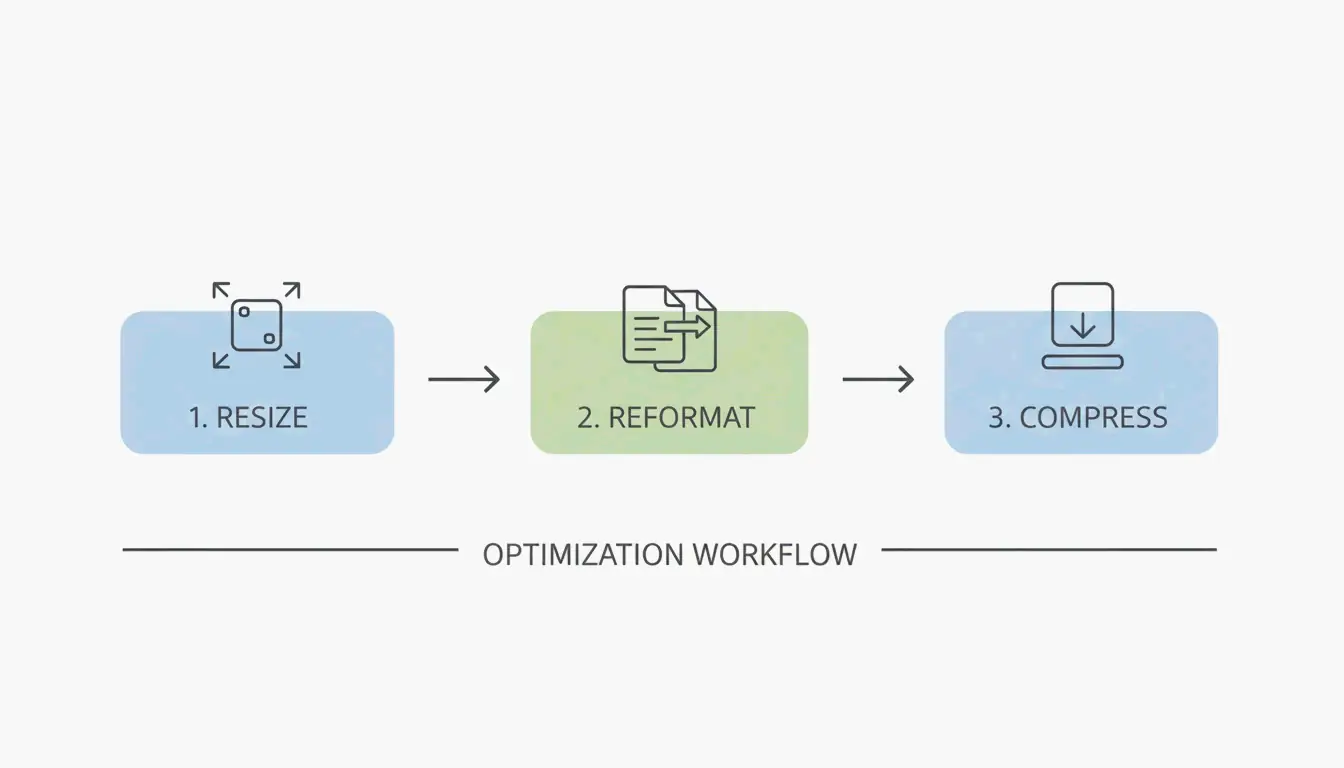
Follow this three-step workflow for professional results:
- Resize — Scale down pixel dimensions to match where the image will actually appear.
- Reformat — Convert older formats to high-efficiency types like WebP or AVIF.
- Compress — Apply quality reduction to strip data the human eye will not notice.

The 75-85% Quality Sweet Spot
The “sweet spot” principle is the most important rule for web compression. Setting quality between 75% and 85% cuts file size significantly without introducing pixelation or blurry artifacts. As the Tech Guide Admin explains, “Smart compression is better than aggressive compression.” It is better to optimize intelligently than to degrade an image for marginal size savings.
According to Mass Image Compressor, modern utilities can achieve a 90% reduction in size, making it practical to share high-resolution galleries instantly, even over mobile networks.
Setting the Right Resolution for Web
High-end cameras produce photos much larger than any digital screen can display. For typical web use, the UCSC web optimization standard recommends a maximum width of 1000 pixels for the longest edge. Resizing a 3000px image down to 1000px slashes file size before compression even begins.
| Source Resolution | Web Resolution | Approximate Size Reduction |
|---|---|---|
| 6000 x 4000 px (24MP) | 1000 x 667 px | ~85% before compression |
| 4000 x 3000 px (12MP) | 1000 x 750 px | ~80% before compression |
| 3000 x 2000 px (6MP) | 1000 x 667 px | ~75% before compression |
Why WebP and AVIF Are the New Kings of Compression
Image formats have evolved to keep up with mobile data limits and the demand for instant loading. Here is how the main formats compare in 2026:
| Format | Compression vs JPEG | Browser Support | Best Use Case |
|---|---|---|---|
| JPEG | Baseline | Universal | Compatibility-first scenarios |
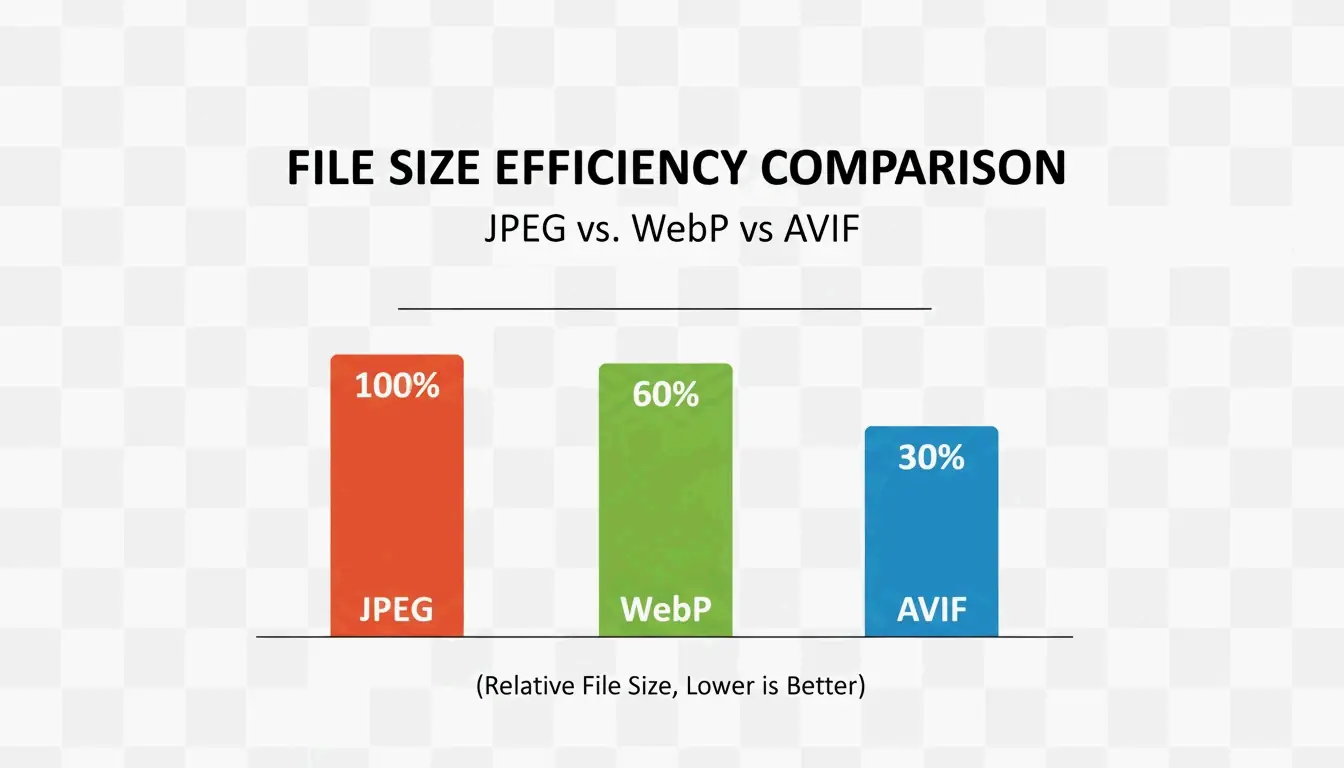
| WebP | 25-35% smaller | All modern browsers | General web use |
| AVIF | 40-50% smaller | All modern browsers | Mobile-first, maximum savings |
| PNG | Larger (lossless) | Universal | Graphics, transparency |
WebP is now the industry standard for the web, offering 25-35% smaller files than JPEG at equivalent quality. AVIF has taken the lead for mobile-first environments, compressing an additional 20% beyond WebP while keeping fine details sharp in high-contrast areas. Since all modern browsers now support AVIF, it is the top choice for cloud storage savings.

Professional Tools for Batch Compression
When working with hundreds of images, batch compression is essential. Professional software like Adobe Photoshop provides full control via the “Export As” function (File > Export > Export As), where you adjust the quality slider and see a real-time preview of the final file size.
For managing mobile formats, HEIC files from iPhones need conversion for use on Windows or the web. Tools like Ashampoo Image Compressor (reporting 80% size reduction capability) and Easy Photo Compressor convert HEIC to JPEG or WebP while preserving metadata.
Best Free Online Compressors for Quick Gains
For quick, one-off compression without installing software:
| Tool | Strength | Best For |
|---|---|---|
| TinyJPG / TinyPNG | Automatic JPEG and PNG optimization | General web images |
| JPG20KB | Shrink to specific KB targets like 20KB | Government forms, ID photos |
| pdfFiller | Compress to specific limits like 300KB | Legal documents, embedded photos |
Troubleshooting: How to Fix Over-Compressed Photos
Over-compression occurs when the quality slider is pushed too low, producing “blocking” or “banding” artifacts — visible blocks of color in skies or shadows. If photos look blurry, the quality setting likely dropped below the 75% floor.
For recovery, AI-driven tools like 4DDiG AI Photo Enhancer use neural networks to reconstruct missing data. According to 4DDiG, these tools upscale the image and clean up compression artifacts to restore original clarity. Note that recovery results are always approximate — prevention is more effective than repair.
Conclusion
Compressing photos in 2026 is about using AVIF and smart tools to reach 80-90% file size reduction without visible quality loss. High-resolution files from modern cameras can exceed 50MB, but with the right workflow they become small enough to share anywhere. For the best results: convert your library to WebP or AVIF, target the 75-85% quality range, and resize images to 1000px wide for web use. This keeps content fast, professional, and accessible on any device.
FAQ
What is the difference between lossy and lossless compression?
Lossy compression (JPEG, WebP) removes data to shrink files significantly, making it ideal for web use and social media. Lossless compression (PNG, TIFF) preserves all original data for perfect quality but produces much larger files, which is best for professional printing or archival.
How do I compress photos on an iPhone without losing quality?
Use the “High Efficiency” (HEIC) format in Camera Settings, which captures high-quality data at roughly half the size of a JPEG. For sharing, use the Shortcuts app or third-party tools like Easy Photo Compressor to resize dimensions and convert to WebP.
Which image format offers the best balance in 2026?
AVIF is the 2026 leader for maximum compression with high fidelity, especially for mobile users. WebP remains the most compatible high-efficiency choice across all platforms, providing a safe middle ground for developers and casual users who need both speed and reliability.